

Gamma AI Alternatives (2026): Which One Is Right for You?
Gamma AI has become a popular choice for creating presentations, documents, and visual content with artificial intelligence. Its biggest advantage is speed: instead of starting with a blank slide, you can give AI a topic or source material and quickly get a structured presentation.
But Gamma isn’t perfect for everyone.
Some users want more control over individual slide elements. Others prefer traditional PowerPoint workflows, larger design libraries, stronger brand controls, or deeper team collaboration.
That’s where Gamma AI alternatives come in.
In this guide, we’ll compare some of the best alternatives to Gamma AI and explain which tool is best for different types of users.
Disclosure: This article may contain affiliate links. If you purchase through one of our links, we may earn a commission at no additional cost to you. Our recommendations remain independent.
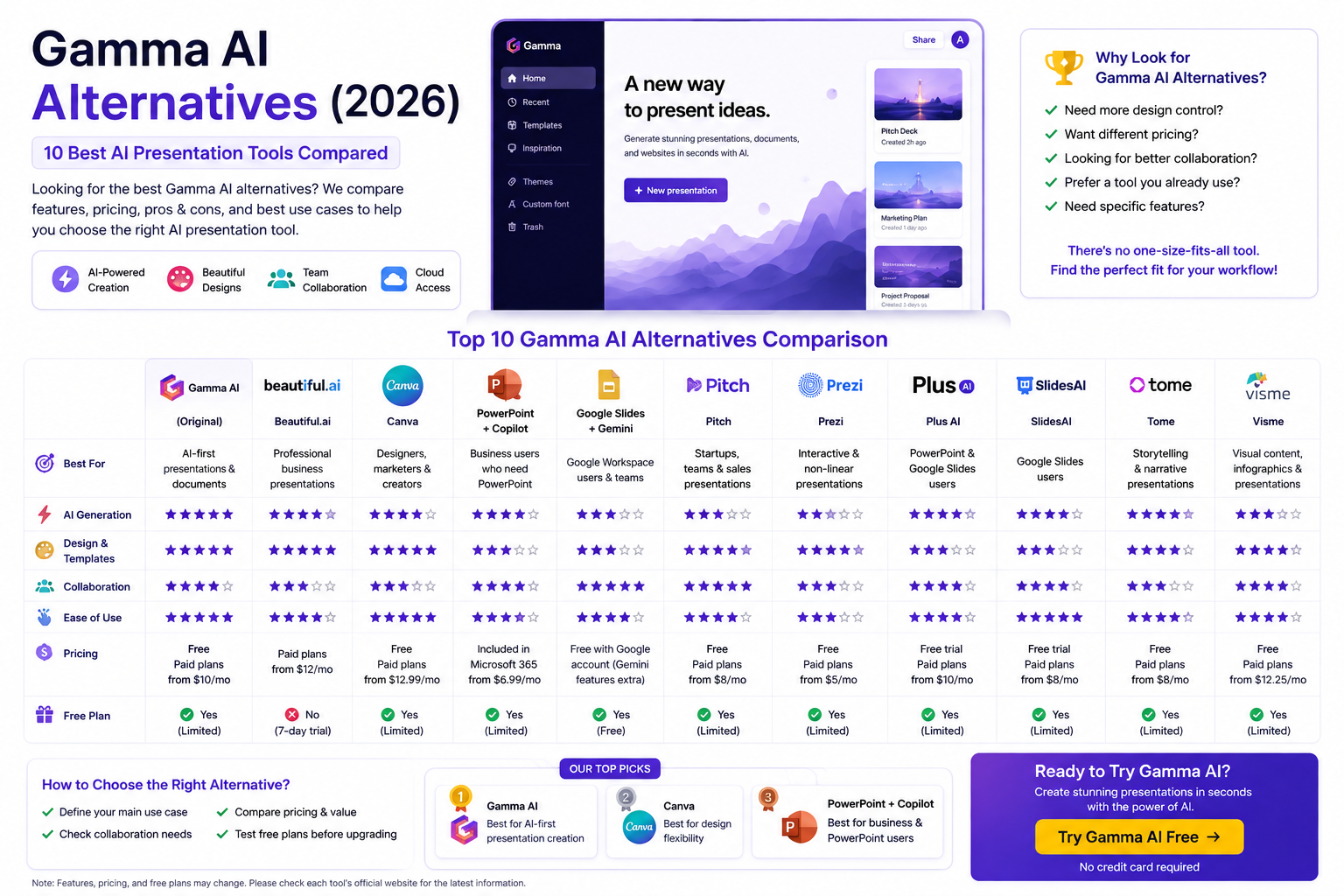
Quick Comparison: Best Gamma AI Alternatives
| Tool | Best For | Main Strength |
|---|---|---|
| Beautiful.ai | Professional presentations | Automated design |
| Canva | Designers & marketers | Templates and creative tools |
| Microsoft PowerPoint + Copilot | Business users | Traditional PowerPoint workflow |
| Google Slides + Gemini | Google Workspace users | Collaboration |
| Pitch | Teams & startups | Team presentations |
| Prezi | Interactive presentations | Zooming presentation style |
| Plus AI | PowerPoint & Google Slides users | AI inside existing tools |
| SlidesAI | Google Slides users | AI slide generation |
| Tome | Storytelling | Narrative presentations |
| Visme | Visual content | Infographics and presentations |
The best option depends less on which tool has the most features and more on how you create and present your content.
1. Beautiful.ai
Best Gamma alternative for: Professional-looking presentations with automated design.
Beautiful.ai focuses heavily on presentation design.
Instead of manually adjusting every element on a slide, its smart templates automatically maintain spacing, alignment, and visual consistency.
Why Choose Beautiful.ai?
Beautiful.ai can be a good alternative if you want:
- Consistent slide layouts
- Professional presentation designs
- Automated formatting
- Business presentations
- Brand-focused presentations
- Less manual design work
Beautiful.ai vs Gamma AI
Gamma is more focused on generating content and presentations from AI prompts.
Beautiful.ai places more emphasis on structured presentation design and automated layouts.
Choose Gamma if: You want AI to help create the presentation from an idea or source.
Choose Beautiful.ai if: Design consistency is your top priority.
2. Canva
Best Gamma alternative for: Marketing, social media, and visual content.
Canva is much more than a presentation tool.
Its large ecosystem includes:
- Presentations
- Social media graphics
- Posters
- Documents
- Videos
- Infographics
- Marketing materials
- Websites
This makes Canva particularly attractive to marketers and content creators.
Canva vs Gamma AI
Gamma is designed around an AI-first content-to-presentation workflow.
Canva provides a broader design environment with extensive templates and creative assets.
Choose Gamma if: You want to generate a presentation quickly from a prompt.
Choose Canva if: You need one platform for presentations and many other types of visual content.
3. Microsoft PowerPoint + Copilot
Best Gamma alternative for: Businesses already using Microsoft 365.
PowerPoint remains one of the most widely used presentation applications in the world.
With Microsoft’s AI features, users can combine traditional PowerPoint editing with AI assistance.
This is particularly useful for organizations that already have:
- Microsoft 365
- Existing PowerPoint templates
- Corporate brand guidelines
- Large presentation libraries
- Established business workflows
PowerPoint vs Gamma AI
Gamma provides a more modern AI-first creation experience.
PowerPoint provides significantly more traditional control over individual slides and presentation elements.
Choose Gamma if: Speed and AI-generated structure are your priorities.
Choose PowerPoint if: You need detailed editing and compatibility with established corporate workflows.
4. Google Slides + Gemini
Best Gamma alternative for: Google Workspace users and collaborative teams.
Google Slides is a strong choice if your team already works inside Google Workspace.
Its biggest advantage is collaboration.
Multiple people can work on presentations, comment on content, and manage files through the Google ecosystem.
Google Slides vs Gamma AI
Gamma can be faster when starting from a blank idea.
Google Slides is attractive when collaboration and integration with an existing Google Workspace environment matter more.
Choose Gamma if: You want AI to create the initial structure.
Choose Google Slides if: Your team already lives inside Google Workspace.
5. Pitch
Best Gamma alternative for: Startups, sales teams, and collaborative presentation workflows.
Pitch is built around modern team presentation workflows.
It can be particularly useful for:
- Startup pitch decks
- Sales presentations
- Marketing teams
- Team collaboration
- Business presentations
Pitch vs Gamma AI
Gamma emphasizes fast AI-powered content creation.
Pitch focuses more heavily on collaborative presentation creation and team workflows.
Choose Gamma if: You want to go from an idea to a presentation quickly.
Choose Pitch if: Collaboration is a major part of your presentation process.
6. Prezi
Best Gamma alternative for: Interactive and visually dynamic presentations.
Prezi takes a different approach from traditional slide decks.
Instead of moving through a sequence of conventional slides, Prezi uses a more dynamic visual canvas.
This can work well for:
- Educational presentations
- Storytelling
- Workshops
- Interactive presentations
- Visual explanations
Prezi vs Gamma AI
Gamma uses a card-based, web-oriented presentation format.
Prezi is better suited to users who want a distinctive visual presentation style.
Choose Gamma if: You want fast AI-generated presentations.
Choose Prezi if: You want a more dynamic presentation experience.
7. Plus AI
Best Gamma alternative for: Users who want AI inside PowerPoint or Google Slides.
One of the biggest reasons people look for Gamma alternatives is that they don’t want to leave their existing presentation software.
Tools such as Plus AI take an alternative approach by bringing AI-powered presentation workflows into familiar environments.
This can be useful if you already have:
- PowerPoint templates
- Google Slides presentations
- Corporate decks
- Existing slide libraries
Plus AI vs Gamma
Gamma provides an integrated AI presentation environment.
Plus AI is attractive for users who want AI assistance while staying closer to their existing presentation workflow.
8. SlidesAI
Best Gamma alternative for: Google Slides users who want AI-generated presentations.
SlidesAI focuses on transforming text into presentation content.
This approach can be useful when you already work in Google Slides and don’t want to move your entire workflow to another platform.
SlidesAI vs Gamma
Gamma is more of an all-in-one AI content creation environment.
SlidesAI can make more sense if Google Slides is already central to your workflow.
9. Tome
Best Gamma alternative for: Storytelling and narrative presentations.
Tome became known for its AI-powered approach to creating visual narratives.
It is particularly interesting for users who care about:
- Storytelling
- Visual structure
- Narrative presentations
- Creative content
- AI-assisted presentation creation
Tome vs Gamma AI
Both platforms emphasize AI-assisted content creation.
The better choice depends on your preferred workflow and the type of presentation you’re creating.
10. Visme
Best Gamma alternative for: Infographics, presentations, and visual business content.
Visme combines presentation creation with broader visual communication tools.
It can be useful for:
- Infographics
- Reports
- Presentations
- Charts
- Data visualization
- Marketing content
Visme vs Gamma AI
Gamma is particularly attractive when AI generation speed is the priority.
Visme is worth considering when you need more types of visual business content in one platform.
Gamma AI Alternatives Comparison
Here’s a simplified way to choose between the major options:
| If You Need… | Consider |
|---|---|
| Fast AI presentation generation | Gamma |
| Automated presentation design | Beautiful.ai |
| Broad creative design tools | Canva |
| Traditional business presentations | PowerPoint |
| Google Workspace integration | Google Slides |
| Team presentation workflows | Pitch |
| Interactive presentations | Prezi |
| AI inside existing slide software | Plus AI |
| Text-to-Google-Slides workflow | SlidesAI |
| Visual storytelling | Tome |
| Infographics and data visualization | Visme |
What Is the Best Free Gamma AI Alternative?
There isn’t one universal answer.
A free option can be better depending on what you’re trying to create.
For design
Canva is worth considering if you want access to a broad design ecosystem.
For traditional presentations
Google Slides is a strong option if you want a familiar browser-based presentation editor.
For existing Microsoft users
PowerPoint can be the most convenient choice if you already have access to Microsoft 365.
For AI presentation generation
Gamma’s Free plan itself is worth trying before moving to another platform.
The best approach is to test the tools with the same presentation prompt and compare the results.
What Is the Best Gamma Alternative for Business?
For business users, the answer depends on the workflow.
Choose PowerPoint if:
- Your company already uses Microsoft 365.
- You need detailed slide editing.
- You work with existing corporate templates.
- PowerPoint compatibility is essential.
Choose Google Slides if:
- Your organization uses Google Workspace.
- Real-time collaboration is important.
- Your team already stores documents in Google Drive.
Choose Pitch if:
- Your team frequently creates presentations together.
- You work in sales or marketing.
- Collaboration is central to your workflow.
Choose Gamma if:
- You want to create the first draft extremely quickly.
- You regularly turn notes into presentations.
- You prefer a modern, web-based workflow.
What Is the Best Gamma Alternative for Students?
Students generally need something simple and affordable.
The most important features are:
- Easy presentation creation
- Templates
- Fast editing
- Sharing
- Export options
- Low learning curve
Gamma, Canva, and Google Slides are all worth considering.
For a student who wants AI to create a first draft, Gamma can save considerable time.
For a student who wants more manual control over design, Canva or Google Slides may be a better fit.
What Is the Best Gamma Alternative for Marketers?
Marketers often need more than presentations.
They may also create:
- Social media graphics
- Advertisements
- Infographics
- Videos
- Reports
- Landing pages
- Marketing documents
For this reason, Canva can be especially useful.
However, Gamma can be more efficient when the main goal is turning a brief or piece of content into a presentation quickly.
Why Do People Look for Gamma Alternatives?
Gamma is powerful, but no tool is perfect.
Users may look for an alternative because they want:
More Design Control
Some users prefer manually controlling every element of a presentation.
Better Existing-Software Integration
Businesses may already have established PowerPoint or Google Slides workflows.
More Templates
Some users prefer platforms with very large template and design libraries.
Stronger Collaboration
Teams may prioritize comments, workflows, approvals, and team management.
Different Presentation Styles
Some presentations work better as traditional slides, while others benefit from interactive or web-based formats.
Is Gamma AI Still Worth Using?
Yes.
Looking for alternatives doesn’t necessarily mean Gamma is a bad product.
Gamma remains particularly attractive for people who want to go from:
Idea → AI-generated structure → Designed presentation
without spending a lot of time formatting slides manually.
The right question isn’t necessarily:
“Which tool is better than Gamma?”
A better question is:
“Which tool fits my workflow better?”
Gamma AI vs Alternatives: Our Verdict
There is no single winner for everyone.
Best for AI-first presentation creation
Gamma AI
Best for design flexibility
Canva
Best for traditional business presentations
PowerPoint
Best for Google Workspace users
Google Slides
Best for automated design
Beautiful.ai
Best for collaborative presentation teams
Pitch
Best for interactive presentations
Prezi
Best for AI within existing slide software
Plus AI
Best for visual business content
Visme
The best choice depends on your workflow, budget, presentation style, and how much control you want over the final result.
Should You Switch From Gamma AI?
You probably don’t need to switch if Gamma already does what you need.
Consider an alternative if:
- You need precise slide-level control.
- Your company requires PowerPoint-first workflows.
- Your team depends heavily on Google Workspace.
- You need a larger design ecosystem.
- You want a different presentation style.
- You need specialized collaboration features.
Before cancelling a Gamma subscription, try one or two alternatives with the same project.
Create the same 10-slide presentation in each tool and compare:
- Content quality
- Design quality
- Editing experience
- Export quality
- Collaboration
- Time required
- Overall cost
That comparison will give you a much better answer than simply choosing the tool with the longest feature list.
Final Verdict: Which Gamma AI Alternative Should You Choose?
Gamma remains one of the strongest options for users who prioritize speed and AI-assisted presentation creation.
However, alternatives can be better for specific workflows.
If you want an extensive design ecosystem, try Canva.
If your organization relies on Microsoft 365, PowerPoint may be more practical.
If your team lives in Google Workspace, Google Slides is a natural choice.
If automated design is your biggest priority, Beautiful.ai is worth considering.
And if collaborative presentation creation is central to your workflow, Pitch deserves a closer look.
For most users, the smartest strategy is simple:
Try Gamma first, identify what you’re missing, and then choose an alternative based on that specific need.
👉 Try Gamma AI Free
Frequently Asked Questions
What is the best alternative to Gamma AI?
There is no single best alternative. Canva, Beautiful.ai, PowerPoint, Google Slides, Pitch, Prezi, and other tools each solve different presentation needs.
Is there a free alternative to Gamma AI?
Yes. Options such as Google Slides and Canva offer free ways to create presentations, although their AI capabilities and limitations differ from Gamma.
Is Canva better than Gamma AI?
It depends on your needs. Canva is particularly strong for broad visual design and creative assets, while Gamma is focused more heavily on fast AI-assisted content and presentation generation.
Is PowerPoint better than Gamma AI?
PowerPoint offers deeper traditional slide editing and is widely used in business environments. Gamma can be faster for generating a first presentation from a prompt or source material.
What is the best Gamma alternative for students?
Gamma, Canva, and Google Slides are all worth considering. Students should choose based on whether they prioritize AI generation, design flexibility, or a familiar presentation editor.
What is the best Gamma alternative for business?
PowerPoint, Google Slides, Pitch, Beautiful.ai, and Gamma can all be suitable depending on an organization’s existing software, collaboration requirements, and branding needs.
Can I use Gamma and another presentation tool together?
Yes. Many users can benefit from using Gamma to generate an initial structure and another presentation tool for final editing or specialized design work.
Related Articles
- Gamma AI Review
- Gamma AI Pricing
- Gamma AI Features
- Gamma AI Free vs Pro
- Is Gamma AI Worth It?
- Gamma AI Templates
- Gamma AI for Students
- Gamma AI for Business
Editorial Note
Information about AI presentation platforms, pricing, features, and availability can change frequently. Always check the provider’s current website before purchasing a subscription or relying on a specific feature.