

Gamma AI Free v
Gamma AI Free vs Pro (2026)
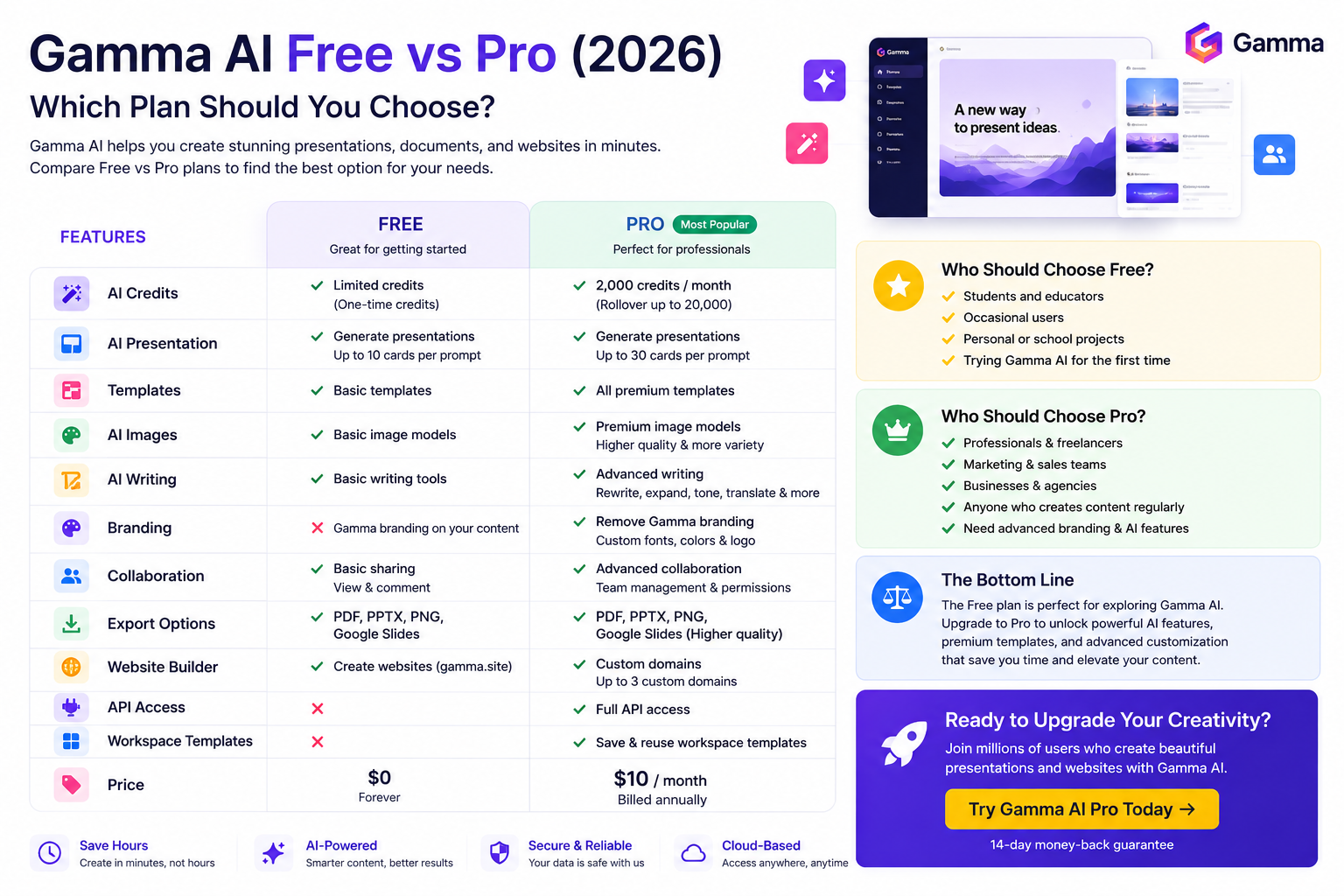
Choosing between Gamma AI Free and Gamma AI Pro can be difficult, especially if you’re new to AI-powered presentation tools. While the Free plan is an excellent starting point, the paid plans unlock additional AI capabilities, premium templates, branding options, and collaboration features designed for professionals and teams. Gamma currently offers multiple tiers—including Free, Plus, Pro, Ultra, Teams, and Business—with increasing AI usage limits and advanced functionality.
In this guide, we’ll compare the Free and Pro experiences, explain the key differences, and help you decide which plan offers the best value for your workflow.
👉 Start with Gamma AI Free:
https://gammaai.app
Quick Comparison: Gamma AI Free vs Pro
| Feature | Free | Pro |
|---|---|---|
| Price | Free | Paid Subscription |
| AI Credits | Limited | Higher monthly allowance |
| AI Presentation Generator | ✅ | ✅ |
| AI Writing Tools | Basic | Advanced |
| Premium Templates | ❌ | ✅ |
| Custom Branding | ❌ | ✅ |
| Remove Gamma Branding | ❌ | ✅ |
| AI Image Models | Basic | Premium |
| Workspace Templates | ❌ | ✅ |
| API Access | ❌ | ✅ |
| Custom Domains | ❌ | Up to multiple domains |
| Team Collaboration | Basic | Advanced |
| Export Options | PDF, PPTX, PNG, Google Slides | Same + advanced branding options |
Gamma’s paid plans also increase the number of cards you can generate per prompt and provide significantly more AI credits each month, making them more suitable for frequent users.
What Is the Gamma AI Free Plan?
The Free Plan is designed for users who want to explore Gamma without paying for a subscription.
When you create a free account, you receive a one-time allocation of AI credits and access to the platform’s core tools. You can create presentations, documents, websites, and social content while learning how Gamma works. The Free plan includes an initial credit balance, supports exports to common formats such as PDF and PPTX, and allows up to 10 cards per AI prompt. AI credits on the Free plan do not automatically refresh.
Best For
- Students
- Casual users
- Personal projects
- First-time Gamma users
- Testing AI presentation creation
Advantages
- Completely free to use
- No credit card required
- Professional AI-generated presentations
- Export to PDF and PowerPoint
- Easy-to-use interface
Limitations
- Limited AI credits
- Gamma branding remains on shared content
- Basic image models only
- Fewer customization options
- Lower AI usage limits than paid plans
What Is the Gamma AI Pro Plan?
The Pro Plan is designed for professionals, consultants, agencies, educators, and businesses that create presentations regularly.
It includes everything available in the lower tiers while adding:
- Thousands of AI credits every month
- Premium AI image models
- Custom branding and fonts
- API access
- Workspace templates
- Multiple custom domains
- Higher limits for AI generation
These features make the Pro plan a better fit for users who rely on Gamma as part of their daily workflow.
Best For
- Freelancers
- Marketing teams
- Sales professionals
- Startup founders
- Agencies
- Business owners
- Consultants
AI Credits Comparison
One of the biggest differences between Free and Pro is the AI credit system.
Free Plan
The Free plan includes a limited number of credits for AI-powered actions. Once those credits are used, they do not refresh automatically. Users can earn additional credits through referral programs or upgrade to a paid subscription.
Pro Plan
The Pro plan provides a much larger monthly credit allowance. Unused monthly credits can roll over up to the plan’s rollover limit, and users can purchase additional credits if necessary. This is especially useful for people who create presentations frequently or work with AI image generation.
Templates and Design
Both plans include professionally designed templates, but the Pro plan offers a wider selection of premium themes and branding options.
With Pro, you can:
- Apply your company logo
- Use custom fonts
- Match brand colors
- Build reusable workspace templates
- Create a more consistent brand identity
These capabilities are particularly valuable for agencies and businesses that produce client-facing presentations.
Which Plan Should You Choose?
Choose the Free Plan if you:
- Want to explore Gamma before subscribing.
- Create presentations only occasionally.
- Need AI assistance for school or personal projects.
Choose the Pro Plan if you:
- Build presentations every week.
- Work with clients or teams.
- Need advanced branding and AI features.
- Want access to premium image models and API functionality.
Continue Reading
In the next sections of this guide, we’ll compare:
- AI Writing
- Presentation Quality
- Collaboration Features
- Export Options
- Performance
- Pricing Value
- Pros & Cons
- Real-World Use Cases
- Frequently Asked Questions
You’ll also learn whether upgrading to Gamma Pro is worth the investment for your specific needs.
👉 Try Gamma AI Today:
https://gammaai.app
Gamma AI Free vs Pro (2026)
Choosing between Gamma AI Free and Gamma AI Pro can be difficult, especially if you’re new to AI-powered presentation tools. While the Free plan is an excellent starting point, the paid plans unlock additional AI capabilities, premium templates, branding options, and collaboration features designed for professionals and teams. Gamma currently offers multiple tiers—including Free, Plus, Pro, Ultra, Teams, and Business—with increasing AI usage limits and advanced functionality.
In this guide, we’ll compare the Free and Pro experiences, explain the key differences, and help you decide which plan offers the best value for your workflow.
👉 Start with Gamma AI Free:
https://gammaai.app
Quick Comparison: Gamma AI Free vs Pro
| Feature | Free | Pro |
|---|---|---|
| Price | Free | Paid Subscription |
| AI Credits | Limited | Higher monthly allowance |
| AI Presentation Generator | ✅ | ✅ |
| AI Writing Tools | Basic | Advanced |
| Premium Templates | ❌ | ✅ |
| Custom Branding | ❌ | ✅ |
| Remove Gamma Branding | ❌ | ✅ |
| AI Image Models | Basic | Premium |
| Workspace Templates | ❌ | ✅ |
| API Access | ❌ | ✅ |
| Custom Domains | ❌ | Up to multiple domains |
| Team Collaboration | Basic | Advanced |
| Export Options | PDF, PPTX, PNG, Google Slides | Same + advanced branding options |
Gamma’s paid plans also increase the number of cards you can generate per prompt and provide significantly more AI credits each month, making them more suitable for frequent users.
What Is the Gamma AI Free Plan?
The Free Plan is designed for users who want to explore Gamma without paying for a subscription.
When you create a free account, you receive a one-time allocation of AI credits and access to the platform’s core tools. You can create presentations, documents, websites, and social content while learning how Gamma works. The Free plan includes an initial credit balance, supports exports to common formats such as PDF and PPTX, and allows up to 10 cards per AI prompt. AI credits on the Free plan do not automatically refresh.
Best For
- Students
- Casual users
- Personal projects
- First-time Gamma users
- Testing AI presentation creation
Advantages
- Completely free to use
- No credit card required
- Professional AI-generated presentations
- Export to PDF and PowerPoint
- Easy-to-use interface
Limitations
- Limited AI credits
- Gamma branding remains on shared content
- Basic image models only
- Fewer customization options
- Lower AI usage limits than paid plans
What Is the Gamma AI Pro Plan?
The Pro Plan is designed for professionals, consultants, agencies, educators, and businesses that create presentations regularly.
It includes everything available in the lower tiers while adding:
- Thousands of AI credits every month
- Premium AI image models
- Custom branding and fonts
- API access
- Workspace templates
- Multiple custom domains
- Higher limits for AI generation
These features make the Pro plan a better fit for users who rely on Gamma as part of their daily workflow.
Best For
- Freelancers
- Marketing teams
- Sales professionals
- Startup founders
- Agencies
- Business owners
- Consultants
AI Credits Comparison
One of the biggest differences between Free and Pro is the AI credit system.
Free Plan
The Free plan includes a limited number of credits for AI-powered actions. Once those credits are used, they do not refresh automatically. Users can earn additional credits through referral programs or upgrade to a paid subscription.
Pro Plan
The Pro plan provides a much larger monthly credit allowance. Unused monthly credits can roll over up to the plan’s rollover limit, and users can purchase additional credits if necessary. This is especially useful for people who create presentations frequently or work with AI image generation.
Templates and Design
Both plans include professionally designed templates, but the Pro plan offers a wider selection of premium themes and branding options.
With Pro, you can:
- Apply your company logo
- Use custom fonts
- Match brand colors
- Build reusable workspace templates
- Create a more consistent brand identity
These capabilities are particularly valuable for agencies and businesses that produce client-facing presentations.
Which Plan Should You Choose?
Choose the Free Plan if you:
- Want to explore Gamma before subscribing.
- Create presentations only occasionally.
- Need AI assistance for school or personal projects.
Choose the Pro Plan if you:
- Build presentations every week.
- Work with clients or teams.
- Need advanced branding and AI features.
- Want access to premium image models and API functionality.
Continue Reading
In the next sections of this guide, we’ll compare:
- AI Writing
- Presentation Quality
- Collaboration Features
- Export Options
- Performance
- Pricing Value
- Pros & Cons
- Real-World Use Cases
- Frequently Asked Questions
<!-
– /wp:list –>You’ll also learn whether upgrading to Gamma Pro is worth the investment for your specific needs.
👉 Try Gamma AI Today:
https://gammaai.app